
 Pay My Bills
 Report a Problem
 Start / Stop/ Move Service
 Business
 Contact Us
 Careers

Understanding My Bill
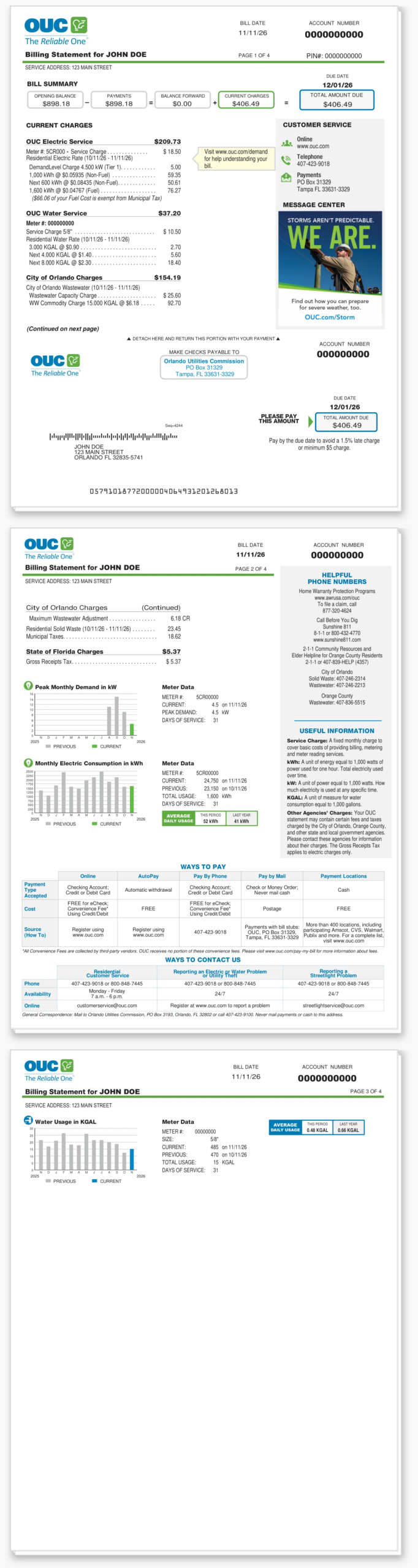
Your bill provides more than just payment information. It is a helpful resource with details on your usage history, money-saving tips and more.
How to Read Your OUC Bill
Gain insight into each section by viewing a virtual walkthrough of a sample bill.
Please note that the bill samples shown on this page may not reflect current OUC service rates. Visit our Service Rates page for the most up-to-date rate information.
Click on the image below to learn more about your bill.
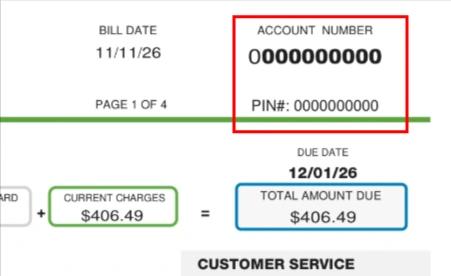
1. Account Number & PIN
Account Number
Use this 10-digit number whenever you contact us about your account.
PIN
Use this number to set up your myOUC online profile. Your PIN is a unique identifier to help OUC ensure your personal information is secure.
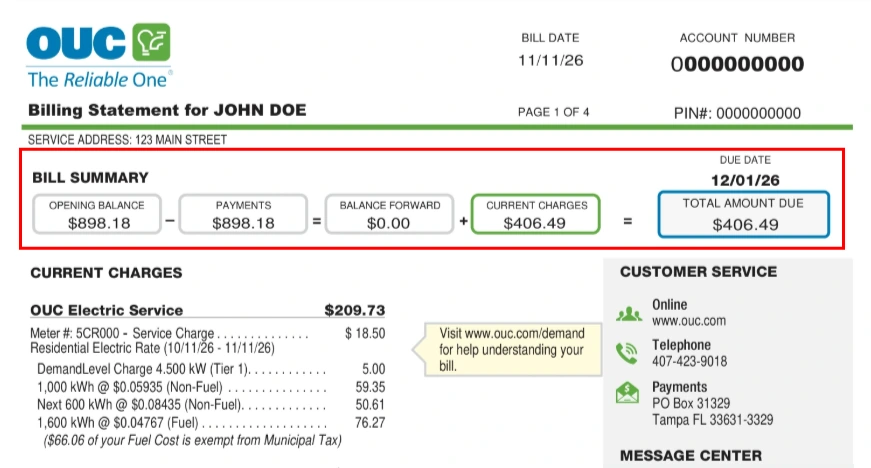
2. Bill Summary
An overview of past billing, payments, current charges and due date. This section shows your balance forward by calculating your last month’s bill minus payments that have been made. It also adds in your current month’s charges to calculate your total amount due. The due date is also listed here.
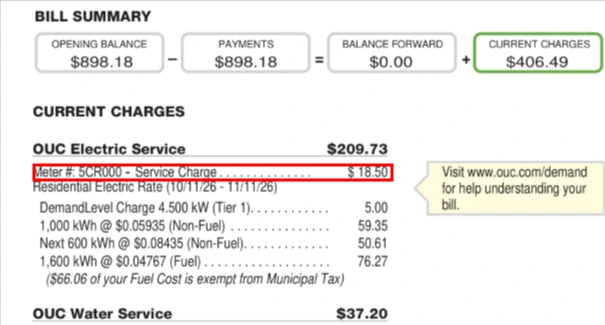
3. Electric Service Charge
Fixed monthly charge covering basic costs of meter reading and billing, plus maintenance of services and meters.
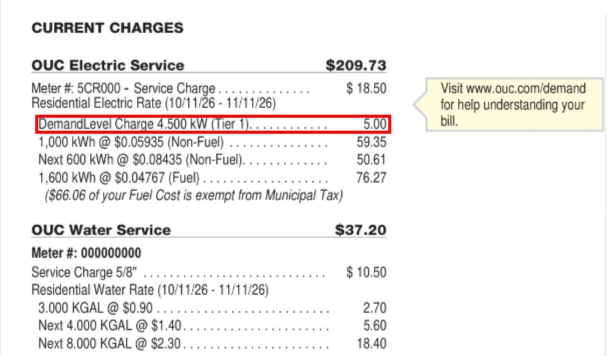
4. DemandLevel Charges
Your Tier (1, 2 or 3) and corresponding monthly charge are based on your peak demand, your home’s highest 15-minute period of electric use in the previous month.
The lower your peak demand, the lower your DemandLevel tier and corresponding charge. More details at OUC.com/demand.
Your peak demand – and tier – resets every billing cycle.
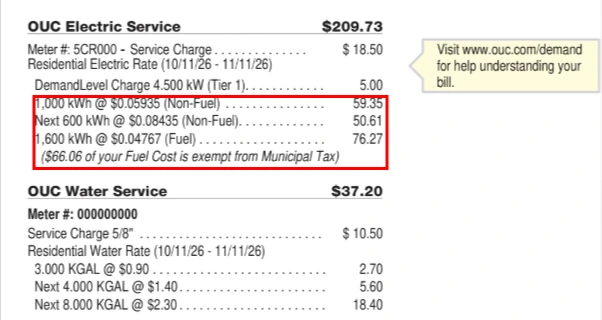
5. Fuel & Non-Fuel Charges
Fuel Charge: The costs of fuel (solar, coal, natural gas, landfill gas, nuclear) and purchased power incurred for OUC to provide electric service to customers.
Non-Fuel Charge: All other costs of providing electric service except fuel and purchased power costs. This includes the cost to own, operate, and maintain distribution and transmission lines, and generation facilities. This rate has been reduced by 12.5% to offset the DemandLevel charge.
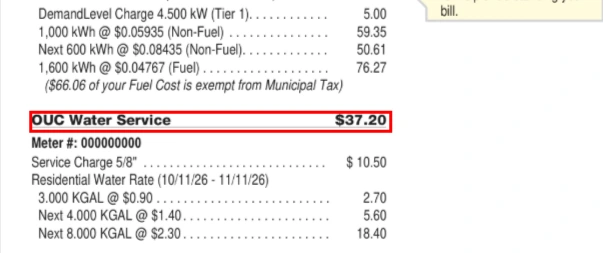
6. OUC Water Charges
Based on a fixed usage charge per 1,000 gallons (KGAL) of water used during the billing cycle multiplied by the corresponding consumption charge, plus a fixed monthly customer charge.
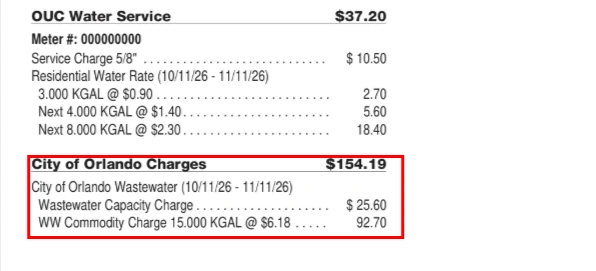
7. Other Agencies’ Charges
(If Applicable): Your OUC bill also lists service fees and taxes charged by state and local government agencies, such as wastewater. OUC only serves as the billing agent and has no control over the costs.
Please contact these agencies for information about their charges. The State of Florida Gross Receipts Tax applies only to electric charges.
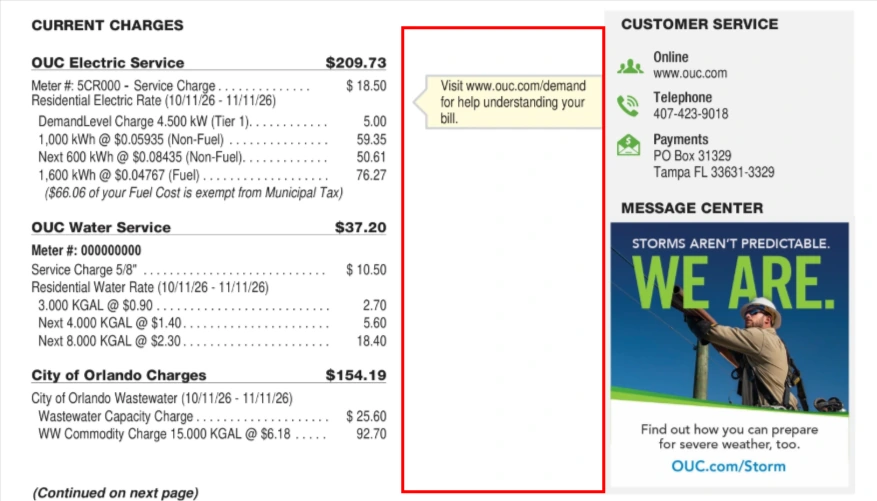
8. Notification Center
This section contains additional information regarding your bill. It only applies in certain circumstances and may not appear each month.
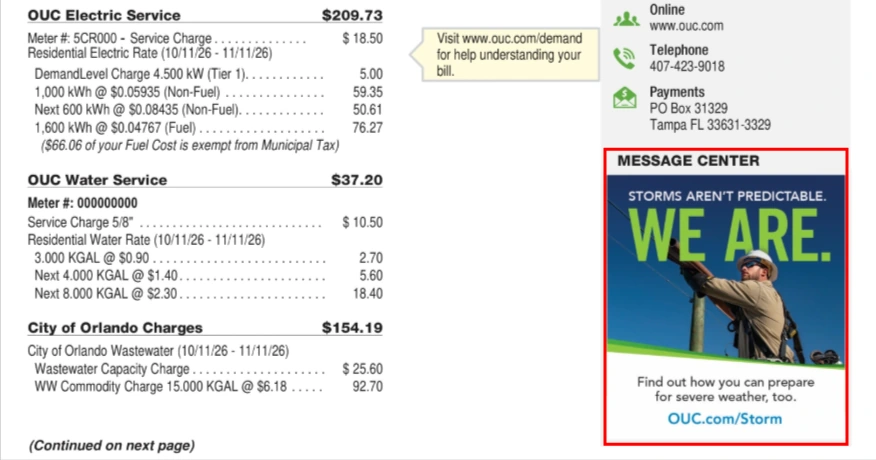
9. Message Center
Information about programs and services that may be of interest to you.
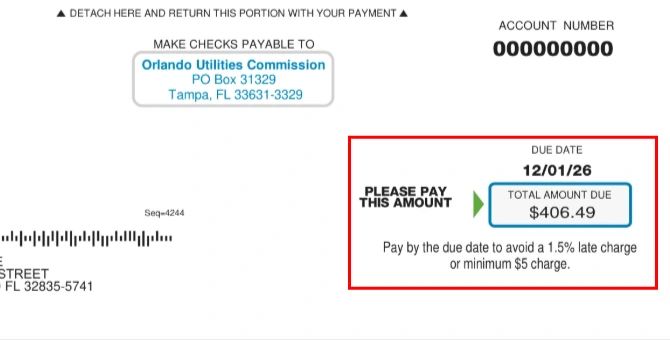
10. The Bottom Line
Easy-to-read monthly total payment information. The total amount due, including any credits or past due amounts.
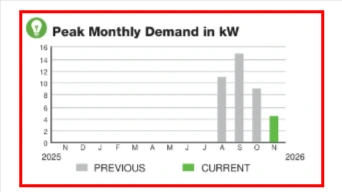
11. Your History of Peak Monthly Demand in kW
Your highest 15-minute period of electricity use for the current and previous months, measured in kilowatts (kW).
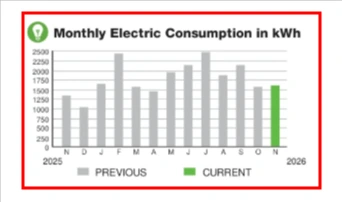
12. Your History of Monthly Electric Consumption in kWh
Your total electric use in the current and previous months in kilowatt-hours (kWh).
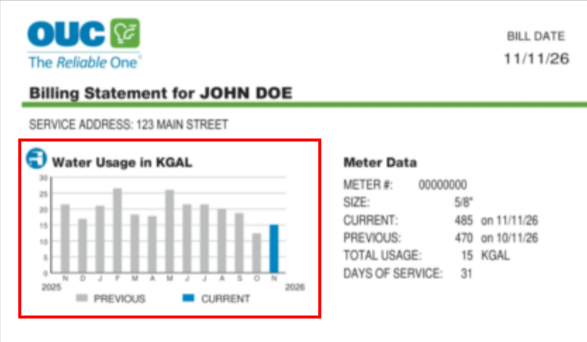
13. Your History of Water Usage in KGAL
Your total water use in the current and previous months in kilogallons (KGAL).
Click on the image below to learn more about your bill.


1. Account Number & PIN
Account Number
Use this 10-digit number whenever you contact us about your account.
PIN
Use this number to set up your myOUC online profile. Your PIN is a unique identifier to help OUC ensure your personal information is secure.
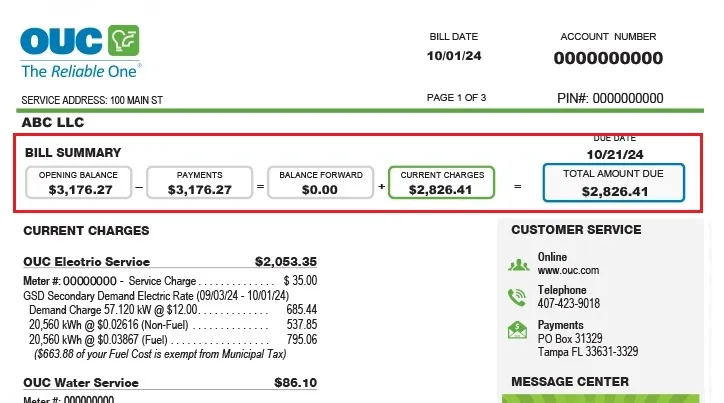
2. Bill Summary
This section shows your balance forward by calculating your last month’s bill minus payments that have been made. It also adds in your current month’s charges to calculate your total amount due. The due date is also listed here.

3. Electric Service Charge
This charge is based on the number of kilowatt hours (kWh) used during the billing cycle multiplied by an energy charge and a fuel charge, plus a fixed monthly customer charge.

4. Fuel & Non-Fuel Charges
Fuel Charge: The cost for fuel required to provide each kilowatt-hour (kWh) of electricity.
Non-Fuel Charge: The cost, not including fuel, to provide and deliver electricity. This includes the cost to operate equipment and maintain facilities.

5. OUC Water Charges
This is based on a fixed usage charge per each 1,000 gallons (KGAL) of water used during the present billing cycle multiplied by the corresponding consumption charge, plus a fixed monthly customer charge.
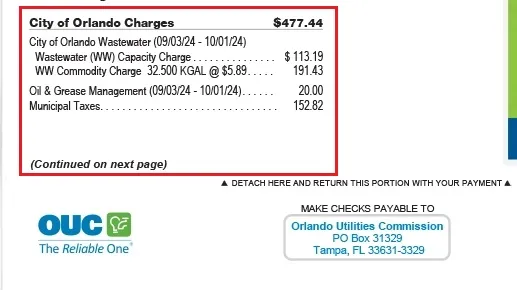
6. Other Agencies’ Charges
(If Applicable): Your OUC bill also lists service fees and taxes charged by state and local government agencies, such as wastewater charged by the City of Orlando. Please contact these agencies for information about their charges. The State of Florida Gross Receipts Tax applies only to electric charges.

7. Notification Center
This section contains additional information regarding your bill. It only applies in certain circumstances and may not appear each month
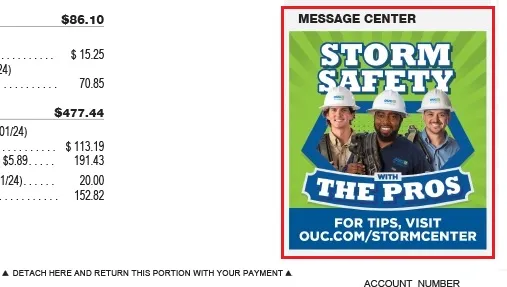
8. Message Center
This section contains text and images with customized information specific to your business. Be sure to always check this section as this information will change each month.
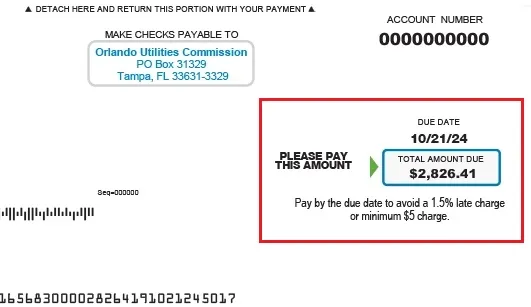
9. The Bottom Line
Easy-to-read monthly total payment information. The total amount due, including any credits or past due amounts.
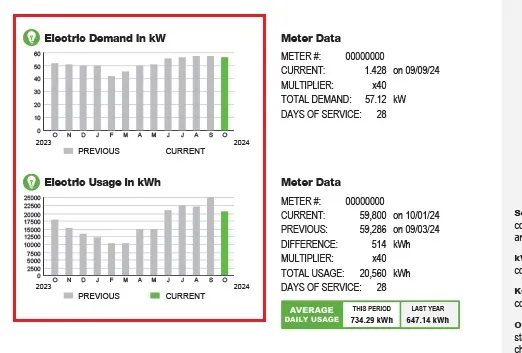
10. Consumption History
These graphs give you a quick visual record of your energy and water usage. The display of usage statistics may vary per customer based on the OUC services you receive at your business.

11. Meter Data
Details service, previous read, usage and units for the current billing period.

12. Average Daily Usage
This box displays the average amount of kWh or KGAL you used in the last billing period.
Click on the image below to learn more about your bill.
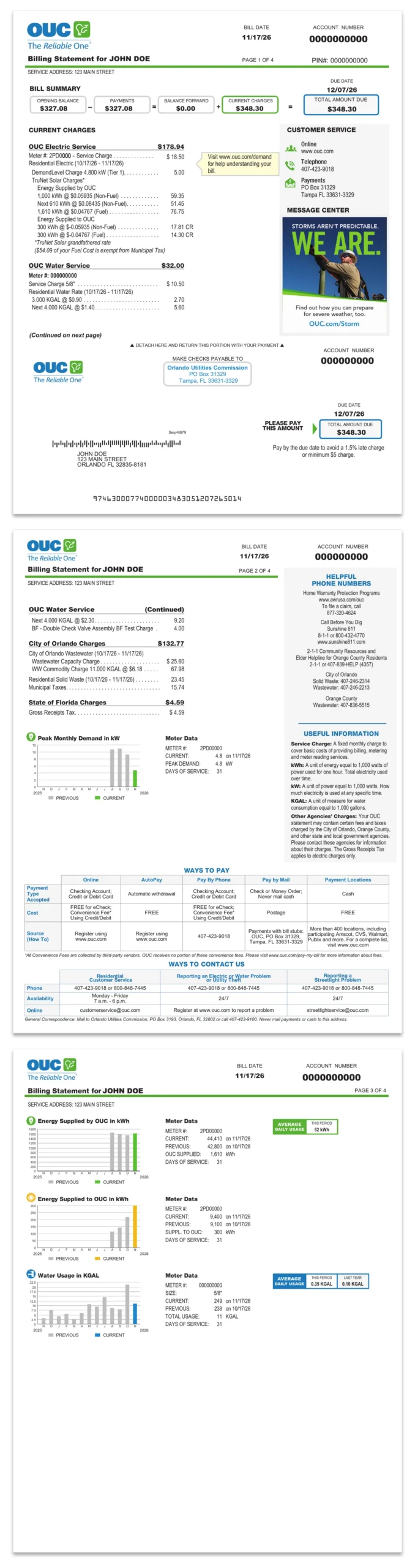
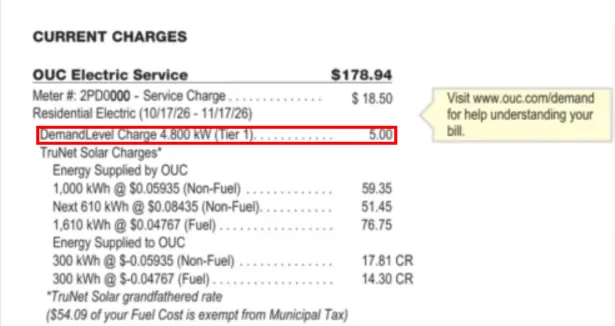
1. DemandLevel Charge
Your Tier (1, 2 or 3) and corresponding monthly charge are based on your peak demand, your home’s highest 15-minute period of electric use in the previous month.
The lower your peak demand, the lower your DemandLevel tier and corresponding charge. More details at OUC.com/demand.
Your peak demand – and tier – resets every billing cycle.
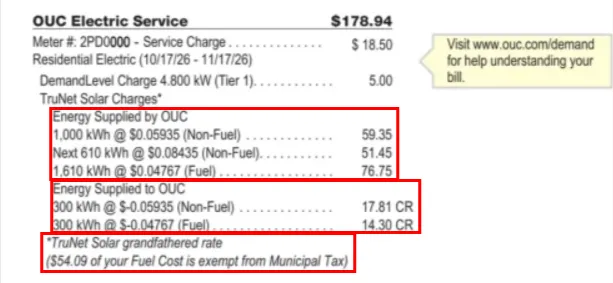
2. TruNet Solar Charges
Energy Supplied by OUC — Energy you receive from OUC when your solar system isn’t producing enough energy to power your home.
Energy Supplied to OUC — Excess energy generated by your system and sold to OUC.
TruNet Solar Grandfathered Rate/TruNet Solar Non-Grandfathered Rate — Rates reflect when customer joined TruNet Solar program. Learn more at OUC.com/TruNet.
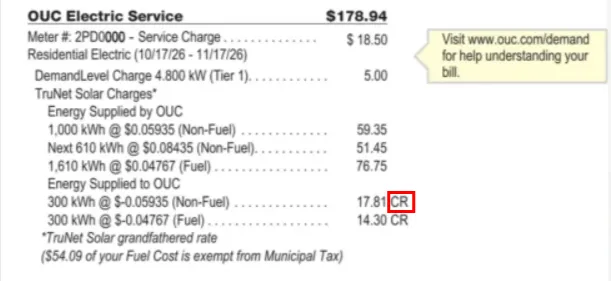
3. Solar Bank Retirement & New Billing Method
On Nov. 1, 2026, OUC retired the solar “bank” that stored excess energy generation in kilowatt-hours (kWh).
Under the updated TruNet Solar program:
Excess energy supplied to the grid is converted into a monetary credit and applied directly to your OUC bill.
If your credit exceeds your electric charges, the remaining balance can be used to offset other charges on your account, such as water service.
Any unused credit will automatically roll forward to future bills. Also, any accumulated value in your solar bank before Nov. 1, 2026, will be reconciled through a final true-up and credited to your account.
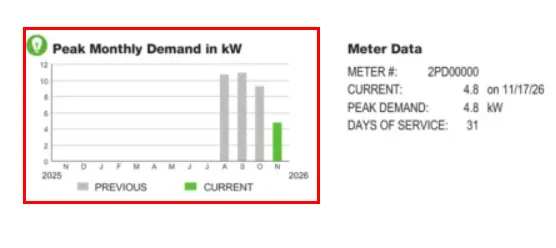
4. Your History of Peak Monthly Demand in kilowatts (kW)
Your highest 15-minute period of electricity use for the current and previous months, measured in kilowatts (kW). This determines your DemandLevel tier.
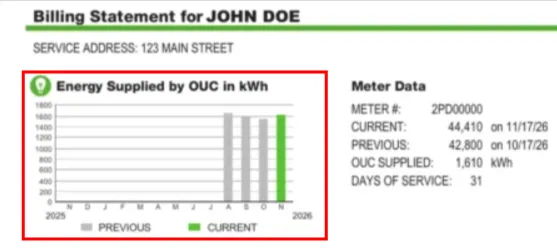
5. Your History of Energy Supplied by OUC in kWh
Energy supplied by OUC in the current and previous months.
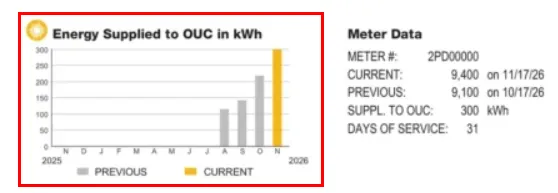
6. Your History of Energy Supplied to OUC in kWh
Energy supplied to OUC in the current and previous months.
Click on the image below to learn more about your bill.


1. Summary of Current Charges
This section summarizes like charges across service addresses. It is the Total Amount Due this month.

2. Service Address
The address displays above each business location’s charges.

3. Customer Reference
This is the reference number supplied by the customer. It may be a charge code, cost center, location code, or other reference specific to the customer’s accounting system.

4. Subtotal
The subtotal represents the total charges for each service address.
Frequently Asked Questions
Where are the Account Number and PIN on my bill?
Your account number and PIN appear in the top right corner of your bill. Your account number is a 10-digit number that you should have readily available whenever you contact us about your account. The PIN is found immediately under the account number. You will need the PIN to create your myOUC online account.
What is the DemandLevel charge?
Your DemandLevel Tier (1, 2 or 3) and corresponding monthly charge are based on your peak demand, your home’s highest 15‑minute period of electric use in the previous month.
The lower your peak demand, the lower your tier and corresponding charge. The easiest way to reduce demand is by spreading out and staggering the use of major appliances, rather than running them at the same time.
Your peak demand – and tier – resets every billing cycle.
What are TruNet Solar charges?
If you are a TruNet Solar customer with a rooftop solar system who joined on or after July 1, 2025, you will be credited for excess energy supplied to OUC at the Community Solar Energy Rate through June 30, 2030. After that credits will transition to the Retail Levelized Fuel Rate, which is updated annually. This is referred to as the TruNet Solar non-grandfathered rate.
If you had an existing solar rooftop system or submitted an approved interconnection application on or before June 30, 2025, you will keep the Full Retail Rate for energy supplied to OUC through June 30, 2045. This is referred to as the TruNet Solar grandfathered rate.
For more details, visit OUC.com/TruNet.
What are Fuel and Non-Fuel Charges?
Your bill separates the Fuel and Non-Fuel charges to help you better understand what is included in your electric service.
A Fuel Charge is the cost of the fuel required to provide each kilowatt-hour (kWh) of electricity.
A Non-Fuel Charge is the cost other than fuel to produce and deliver electricity to your home or business, including the cost to operate equipment and maintain facilities.
OUC has reduced the non-fuel rate by 12.5% to help offset the DemandLevel charge and support affordability.
Why am I being charged for wastewater?
Your bill also lists service fees and taxes charged by state and local government agencies, such as wastewater charged by the City of Orlando. Please contact these agencies for information about their charges. The State of Florida Gross Receipts Tax applies only to electric charges.
Why are there yellow boxes in the middle of my bill? Will they appear every month?
Yellow notification boxes will appear next to the Current Charges section only if a charge needs additional explanatory information. These may not appear every month and are only included when additional information is available to help clarify your charges.
What is the Message Center on my bill?
The Message Center shares information on programs and services that may be of interest to you.
Where are the usage graphs that show my historical usage?
Electric and water usage graphs appear immediately after the Current Charges section of your bill and often appear on the backside of a single-page bill. For electric service you have charts showing your demand and consumption for the current and previous months. Each water service (water, irrigation, reclaimed water, etc.) will have its own consumption chart.
Where is the summary for a consolidated bill?
Consolidated customers can see their billing summary on the first page of the bill. Each individual service address will appear on a separate page.
Can I monitor my energy and water usage online?
OUC’s Usage Dashboard is a presentation of your usage trends. It can help you better understand the days and times you use the most energy and water. For energy, you can track your monthly total electric use (consumption), as well as your peak demand and current DemandLevel tier.
OUC’s My OUC Energy Coach provides clear insights into how and when you use electricity, helping you make smarter choices and lower your bill before it arrives. The Appliance Breakdown shows how much major appliances contribute to your bill, and you receive savings strategies tailored to your energy usage. Plus, you are automatically enrolled for high bill alerts.
To view the Usage Dashboard and My OUC Energy Coach, simply log into your myOUC account and scroll down to the Tools & Analytics section of the Account Summary page
Related Content

Service Rates & Costs
OUC offers transparent utility rates and costs. View our electric rates, water rates and more to better understand your billing and options.

Financial & Medical Assistance
Get support with OUC’s assistance programs, including utility bill payment help via Project CARE, our medical alert program and more.

Billing Programs
Manage your OUC bill payments to best fit your budget or request financial assistance when you need it. Learn about Budget Billing and OUC Power Pass programs.